Posted on Leave a comment

2FA Setup

2FA Setup

To ensure the 2FA automation works seamlessly for both the client  and account creator, please follow the steps below. If you prefer not to automate the 2FA verification through the BH client, simply enter a random email and password, then input the verification code manually. Make sure the email and password fields are not left blank.

Requirements:

  • 64 bit Windows operating system
  • Google Chrome browser installed
  • 1 Single brand new Gmail address with 2 Factor Authenticator enabled with access configured (see below)

Once you have enabled Two-Factor Authentication, head to your Gmail settings and select “App passwords.”

You can simply search for this option under the “Search Google Account” feature at the top of the page.

  • In App Passwords, enter “Bot Manager” as the app name and click create.
  • A generated app password will appear.
  • Copy and paste this password into the  BH client under “Gmail password”, and be sure to include your Gmail address. 

Number of accounts: The number of accounts you wish to create

Daily quota: The number of free cloud operations you own. By default, you receive 30 daily for free

Fixed quota: The number of paid cloud operation you purchase from our store.

Gmail account: A gmail address which has the access configured as described above

Gmail password: Generated app password  

Run task after creation: If you enable this, it will automatically insert the created accounts into the dashboard and start them with the selected task

Mirror mode: it will allow you to run the task directly in mirror mode

Assign to server: This works with the option above, it selects the server when adding it to the dashboard. Leave on localhost if you are not sure.

Proxy pool: Allows you to configure which proxies the manager will use to run the task on after the creation. 

Posted on Leave a comment

BH Client

Botting Hub client

The BH Client is compatible exclusively with Jagex accounts, as legacy accounts are no longer supported by Jagex. It can seamlessly manage 2FA verification by accessing your email inbox. To enable this, please configure the app passwords as described in step 3. For this step, the email password entered in the client should be the app-specific password generated by gmail as explained in the next step. 

It’s recommended to use one character per account. If you’re botting multiple Jagex accounts or converting legacy accounts to Jagex accounts, you can take advantage of the +Gmail method.

For example:

All emails with the +suffix will be forwarded to your primary Gmail account (maingmail@gmail.com), making account management simple and efficient

Proxies are automatically configured in the background, allowing the BH Client to securely isolate each of your accounts.

Settings Explained

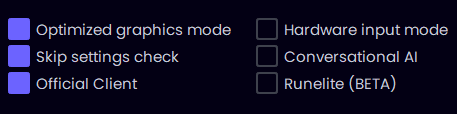
Optimized Graphics Mode
Speeds up graphics processing and resolves client flickering, delivering smoother performance for both solo users and large-scale account farms.

Hardware Input Mode (Experimental)
Routes all bot actions through your actual hardware mouse. This advanced anti-detection feature ensures all in-game inputs are generated by physical hardware, not software, making it virtually impossible for Jagex to distinguish between bot and human input. Provides an extra layer of protection if Jagex tries to detect synthetic mouse actions typical of most bots. Ideal for account farmers aiming to minimize ban risk, blend behavior into human patterns, and reliably operate multiple clients like a real player.

Skip Settings Check
Bypasses the initial configuration routine at startup, allowing fast deployment for users with standardized setups. If you enable this, you must not change any settings, camera angle and other configurations done initially. 

Conversational AI
Enables the bot to participate in game chat using AI-driven responses. This paid feature enhances realism and social blending while supporting advanced automation and content creation.

Runelite (BETA)
Allows your bot to operate directly on runlite. The current version includes all scripts except: Blast Furnace, Fishing, Guardians of the Rift, Mining, MLM, Woodcutting and it currently works only with hardware mouse. 

Botting AI Scripts setup

NMZ:
Script requirements: Rock cake+ NMZ Unlocked (vampire slayer, tourist trap, fishing contest, the grand tree, tree gnome village, mountain daughter); enough coins in the coffer and supplies in bank; initial dream made. Start the script at the NMZ area.  Have the supplies in your main bank tab. Do not add the supplies in different bank tabs. Below is an example of settings for both absorption potions and prayer potions.

Absorption potion example
(requires over 200k points/rock cake)

Prayer potion example (requires over 150 prayer potions)
Use this setup until you get enough points

MLM:
30 mining; pickaxe in inventory; start at MLM Bank
AGILITY:
start near near the selected course with food in your inventory (shrimp, salmon, trout, tuna, monkfish, Jug of wine, cake, chocolate cake and slices)
SAND CRABS:
start near the sand crab isle bank; have the supplies in your main bank tab. Do not add the supplies in different bank tabs.
MINER:
start near the selected mining location with a pickaxe in inventory;
MAGIC:
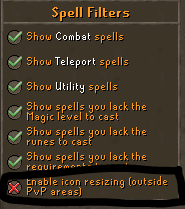
have runes in the inventory; make sure your magic spellbook is configured as seen below. 

COOKING:
start at rogues den with raw fish in bank for cooking in P2P. For F2P, start at the draynor bank. Have the raw fish at the top of your bank and do not use placeholders.
FLETCHING:
start at the selected bank. Have enough supplies at the top of your bank and do not use placeholders.
CRAFTING:
start at the selected location. Have enough supplies at the top of your bank and do not use placeholders.
FIREMAKING:
start at the selected location. Have enough logs at the top of your bank and do not use placeholders.
FISHING:
start at the selected fishing location with fishing supplies in inventory (fishing rod, feather, etc)
HUNTER:
Start at the selected hunting spot with enough hunting supplies in your inventory (20 box traps, bird snare, etc). Level requirements: Crimson swift (level 1), Copper longtail (level 9), Tropical wagtail (level 19), Swamp lizard (level 29), Ferret (level 27 ), Chinchompa (level 53), and Red chinchompa (level 63). Supported locations: Piscatoris/Feldip hills. Eagle’s Peak quest is required to lay down box traps.
WOODCUTTING:
In Powerchop mode, the bot will continuously chop your selected tree near your character’s current location and drop the logs for maximum efficiency. To use this mode, simply move your character to your desired chopping area before starting.
Banking mode will chop your selected tree and automatically bank the logs at the nearest accessible bank.
BLAST FURNACE:
Ensure you have enough coins, ores, stamina potions, a coal bag, and ice gloves stored in your bank. Place all required supplies at the top of your bank and avoid using placeholders. Start the bot on a Blast Furnace world while standing inside the Blast Furnace area.

Posted on Leave a comment

Download

System requirements

Supported Operating Systems: Windows 10 ; 11  (Home, Pro, Educational, Enterprise); Windows Server 2016+; Linux; Mac OS

Software requirements

Download these files if you purchased the AI scripts:

Proxifier key: KFZUS-F3JGV-T95Y7-BXGAS-5NHHP

Windows language settings for keyboard/apps/display/regional format must be English;
Screen display must have 100% scaling.

Download these filed if you purchased the bot manager:

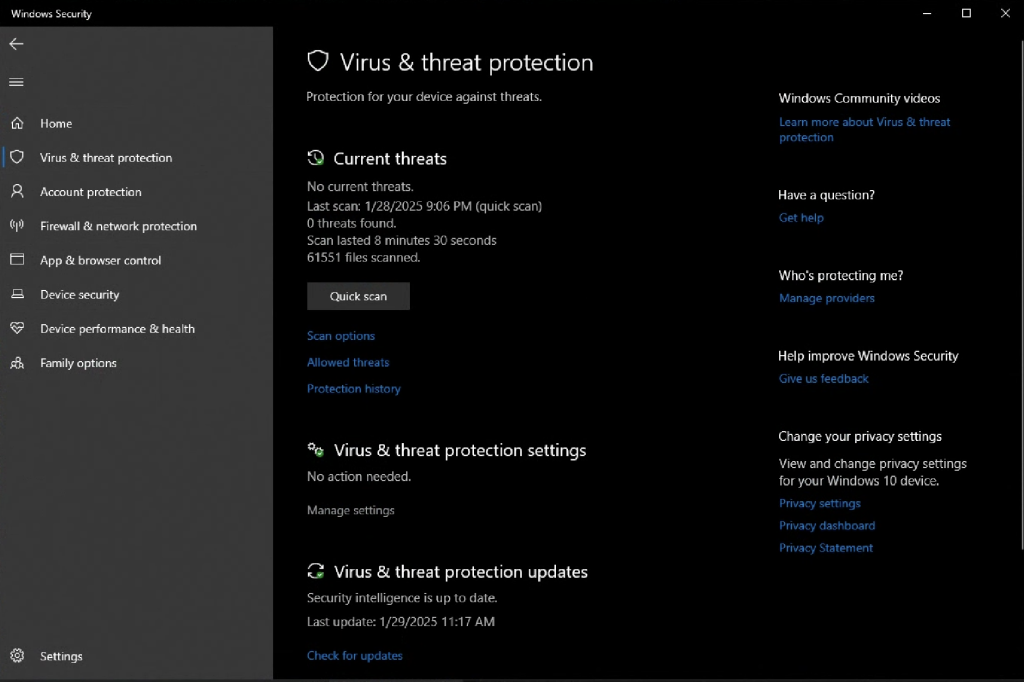
Configure Windows Security Exclusions

1. Open Windows Security settings

2. Click "Manage settings" under Virus & threat protection settings

Follow this step if your antivirus is preventing the client from running

3. Click "Add or remove exclusions" under Exclusions

4. Click "Add an exclusion", and select Folder

5. Type "%SYSTEMDRIVE%%HOMEPATH%\Botting Hub" and click "Select Folder"

6. Go back to Virus & threat protection, and click "Manage settings"

7. Turn off Real-time protection

Posted on Leave a comment

Ironman botting

Ironman OSRS: 10-Step Guide to Efficient Botting with BottingHub

Introduction

ironman osrs

Embarking on an Ironman OSRS adventure is a commendable challenge. However, the grind can be daunting. With BottingHub’s advanced AI scripts, you can automate tedious tasks while maintaining the integrity of your Ironman experience.

Why Choose BottingHub for Your Ironman OSRS Account

BottingHub offers AI-powered scripts tailored for Ironman accounts, ensuring compatibility and safety. With features like human-like behavior and break timers, BottingHub minimizes detection risks.

Essential Skills to Bot on an Ironman OSRS Account

  • Fishing & Cooking: Automate catching and cooking fish, vital for sustenance and quests.

  • Hunter: Train by catching chinchompas, useful for Ranged training.

  • Mining & Motherlode Mine: Gather ores and gems efficiently.

  • Agility: Improve run energy restoration through rooftop courses.

  • Magic: Train via High Alching, converting items into gold.

  • Combat Training: Use Sand Crabs for melee and Ranged XP.

  • Runecrafting: Engage in Guardians of the Rift and Blood Runecrafting for runes and XP.

  • Fishing Trawler: Obtain the Angler outfit to boost Fishing XP.

Starting from Level 3: A Step-by-Step Botting Plan

1. Start With Agility (Level 1–50+)

Begin with BottingHub’s Agility script to unlock the Graceful outfit, which is essential for conserving run energy. Train on the Gnome and Draynor courses until you reach higher rooftop courses.

💡 Why Agility first?

  • Graceful = Faster training for everything else

  • Safe & low ban risk when botted with breaks

osrs agility guide with bots

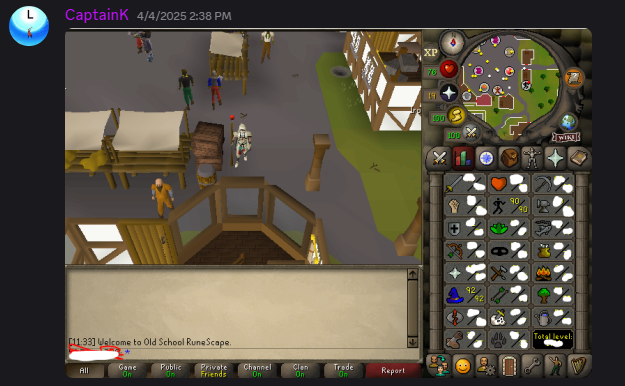
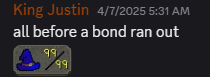
This is me getting 99 on a fresh level 3 account.

2. Move to Mining (Level 1–40)

Use the Motherlode Mine script and the regular mining script to train your mining while passively collecting ores and gems. You’ll use them later for Smithing and Quests.

osrs mining bot

3. Woodcutting & Firemaking Combo

Run the Woodcutting script to gather logs, then use the Firemaking script to hit level 50 Firemaking. This unlocks access to Wintertodt, one of the best Ironman money makers.

4. Thieving for Early Food

Use the Thieving script on stalls in Ardougne or Baker’s stall in Kourend e to steal cakes. You’ll use these as food for early Wintertodt and training. Aim for 700 cakes. 

5. Wintertodt Script to 99 Firemaking

This is your biggest milestone early on. Use the AI Wintertodt script to train from level 50–99 Firemaking. You’ll gain:

  • 🔹 Tons of useful supplies (ores, fish, seeds)

  • 🔹 Massive coin stack (~500k–1m+)

  • 🔹 Great XP gains for low combat

6. Buy Essentials with Coin Stack

Once you’ve stacked some coins from Wintertodt, purchase:

  • 🔸 Rune axe for better Woodcutting XP

  • 🔸 Rune pickaxe for faster Mining

  • 🔸 Thousands of feathers for Fishing

All of this can be botted afterward.

7. Go Fishing

Use the Fishing script to grind your food and cooking XP:

  • Shrimp → Trout/Salmon → Tuna/Lobsters → Minnows

  • Ironman-friendly script ensures no trade dependence

8. Add Skills Slowly After That

Now you’re ready to diversify your Ironman:

Hunter for Chinchompas

Magic via High Alching

Combat with Sand Crabs

Runecrafting with Guardians of the Rift

Blood Runes for GP & Magic XP

Cooking, Crafting, Smithing, and Slayer can also be automated

9. Safe Botting for Ironman OSRS Accounts

Here’s how to bot safely:

  • 💻 Use AI scripts (not static clickers)

  • ⏰ Enable human-like breaks (20-30 min on, 5-10 min off)

  • 🔄 Rotate between skills every day

  • 🧠 Monitor updates and avoid peak hours

10.Get Started Today – Ironman OSRS Botting Made Easy

Whether you’re building your Ironman from scratch or just automating the grind, BottingHub’s Ironman-compatible scripts make it simple, safe, and scalable.

Posted on

Introduction

**Copyright Notice**
 No part of this report may be reproduced or transmitted in any form whatsoever, electronic, or mechanical, including photocopying, recording, or by any informational storage or retrieval system without expressed written, dated and signed permission from the author. If you do so, we can take legal action against you and make your life much less pleasant. All copyrights are reserved.

Introduction

The tutorials section is a growing collection of goldfarming tutorials written by NotABot and the Botting Hub associates, based on years of goldfarming experience which will help you improve your botting skills. The first part (Setup) will help you jump into botting and briefly present all the tools you will need to get started, but the documentation must be followed first, in order to set up the AI scripts you purchased. While you only need to have the client and some scripts, we strongly recommend you start using proxies as early as possible in your goldfarming journey. The servers are not something you should worry about until your farm has scaled up enough to no longer fit on your PC.

We also offer some premium content for those who are already familiar with botting, but would like to begin goldfarming. These articles present some techniques that you can employ when planning your farm. A case study is also provided to showcase the entire process of setting up a goldfarm, step by step with as much detail as possible.

A small list of selected goldfarming methods that we endorse is provided for those who are having a hard time finding a method. We regularly update these, as the game progresses and the market changes with it. The guide itself is in continuous development and will be regularly expanded.